SaaS UX audit services that show where users struggle, and what to fix first
We review your product the way your users meet it, from sign-up to everyday work to the upgrade. You get a ranked list of usability problems, the evidence behind each one, and clear recommendations your team can act on.
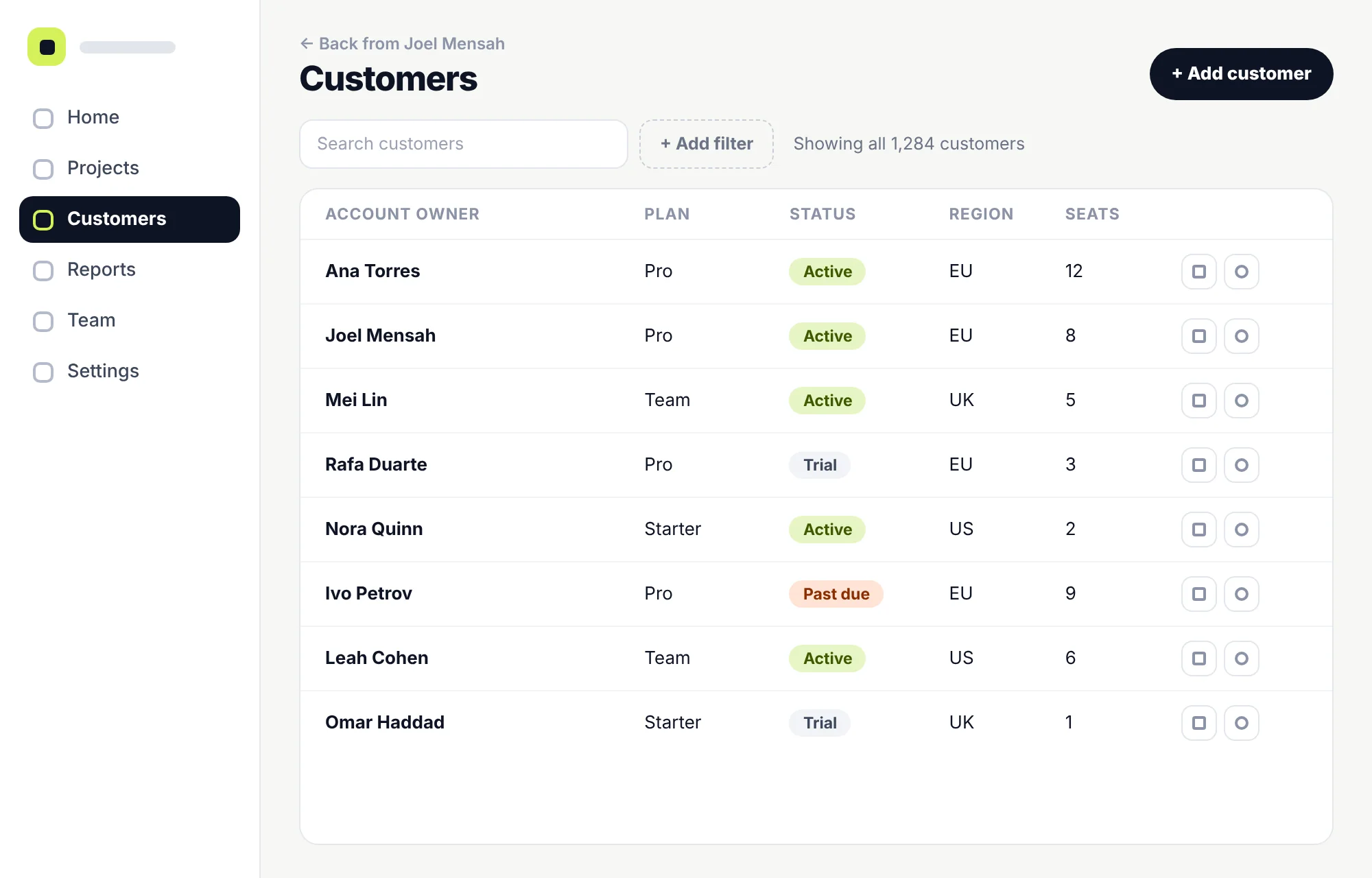
1Two buttons compete for attentionRating…MediumExpert review
2Empty dashboard, no next stepRating…HighExpert review
3Setup checklist is easy to missRating…MediumYour data
4Icon-only actions, no labelsRating…LowExpert review
What the audit covers
Sign-up and onboardingSetup and activationCore workflowsNavigationTables, filters and searchRoles and team invitesBilling and upgradesEmpty and error states
When an audit helps
You can see something’s wrong. The audit finds where.
Most teams come to a UX audit with a number moving the wrong way or a complaint they keep hearing. These are the most common starting points, and the question the audit answers for each.
People sign up, then go quiet
The audit answersWhere between sign-up and the first useful result do new accounts stall, and why?
Support keeps answering the same “how do I…” questions
The audit answersWhich screens make simple tasks hard to find or understand?
A new feature shipped, and few people use it
The audit answersCan users find it, see what it’s for and get it to work?
Customers export to spreadsheets to get their work done
The audit answersWhat’s missing or awkward in the workflow that pushes them out of the product?
Demos go well, but self-serve trials don’t
The audit answersWhat does your sales team explain that the product doesn’t?
You’re planning a redesign
The audit answersWhat’s actually broken, what works and should stay, and what can be fixed without starting over?
UX audit or something else?
What a UX audit is, and what it isn’t
A UX audit is an expert review of a live product. An experienced designer works through your key journeys, checks them against established usability principles and common SaaS patterns, and brings in your data where you have it. It’s quick to run and doesn’t need recruited participants. It also has limits, so here’s where it sits next to other kinds of work.
This page
SaaS UX audit
“Where does our product make things hard for users, and what should we fix first?”
Based on
An expert review of your key journeys, plus your analytics, recordings and support themes when you can share them.
You get
Ranked findings with evidence, recommendations and a fix list your team can work from.
Usability testing
“Can real people complete these tasks?”
Based on Watching people from your audience try set tasks.
It finds problems an expert can miss, especially ones tied to your users’ knowledge. An audit often shows which flows are worth testing.
UX research
“Who are our users and what do they need?”
Based on Interviews, surveys and observing how people work.
Research shapes what to build. An audit looks at what you’ve already built.
Conversion (CRO) audit
“Why don’t more visitors sign up or buy?”
Based on Analytics and experiments, mostly on marketing pages and sign-up.
The two overlap at sign-up and upgrade. A UX audit goes further, into the product people use every day.
Accessibility audit
“Can people with disabilities use the product?”
Based on Testing against WCAG, including with assistive technology.
We flag clear accessibility problems we come across, such as low contrast or unlabelled buttons. That isn’t a full conformance audit.
Technical or website audit
“Is it fast, error-free and easy for search engines to read?”
Based on Performance tools, crawlers and code review.
We note slow or broken moments that affect users, but we don’t review code or SEO.
Redesign
“What should the product look like now?”
Based on New flows and screens, designed and tested.
An audit doesn’t include redesigned screens. It tells you whether you need a redesign at all, and if you do, what it has to fix.
What we review
We follow your users through the product
An audit is organised around journeys, not single screens. We sign in as each type of user you have and work through the moments that decide whether they stay.
Most audits focus on the journeys that matter most right now rather than every screen. We agree which ones before we start.
1
Sign-up and first login
How much you ask before people see any value
Whether the first screen makes the next step obvious
Email checks, SSO and invite detours
2
Setup and first result
Empty states that guide, not just say “no data”
Templates, sample data and setup checklists
Steps between sign-up and the first useful result
3
Everyday work
The tasks people repeat most often
Tables, filters, search and bulk actions
Forms, validation and saving
4
Finding your way
Navigation, labels and page structure
Whether features can be found by the people who need them
Consistency between areas built at different times
5
Teams and roles
Inviting colleagues, roles and permissions
What each role can see and do
Hand-offs between people
6
Billing and upgrades
Plan limits and what happens when you reach them
Upgrading, downgrading and failed payments
The end of a trial and what users are told
7
When things go wrong
Error, loading and offline states
Undo, confirmations and destructive actions
Help content and the way to support
How findings are made
Every finding says what it’s based on
Some problems are clear to an experienced eye. Others only show up in your data, or when you watch someone use the product. Each finding is labelled with its source, so your team knows how much weight it can carry.
Expert reviewIncluded in every audit
An experienced designer works through each journey and checks it against recognised usability heuristics, accessibility basics and patterns that are common in SaaS products.
Good at finding
Unclear labels, inconsistent patterns, missing states and confusing flows.
Its limit
It’s informed judgement. On its own, it can’t tell you how many people a problem affects.
Your dataWhen you can share it
Product analytics, funnels, session recordings and support tickets show where people actually drop off, repeat themselves or ask for help.
Good at finding
Seeing how often something happens, and where.
Its limit
Data shows what happened, but not always why. That’s where the review and user sessions help.
User sessionsOptional, scoped separately
Short sessions where people from your audience try key tasks while we watch and listen.
Good at finding
Problems tied to your users’ knowledge and habits that an expert might not predict.
Its limit
It takes longer and needs recruiting, so it works best aimed at the questions the audit raises.
When a finding needs more evidence before you act on it, the report says so and suggests how to check it.
How we rank problems
How we decide what to fix first
Each finding gets a severity rating and a rough effort estimate, so your team can see what matters most and where the quick wins are. Severity weighs four things.
How often it happens
Does every new account run into it, or only people using one rarely used setting?
How much it gets in the way
Is it a moment of confusion, or does it stop someone finishing the task?
Whether it keeps happening
Do people work it out once, or trip over it every time they come back?
Where it sits in the journey
A problem at sign-up, setup, a core task or payment costs more than one in a rarely used setting.
Severity
Critical
Stops people finishing a key task, such as signing up, inviting a colleague or paying.
Fix first
High
Causes real difficulty on an important path. Many users struggle or need help.
Plan soon
Medium
Slows people down or confuses them, but they get there in the end.
Schedule
Low
Polish and consistency. Worth fixing when you’re working in that area.
When nearby
Effort
Quick fixCopy, labels or small layout changes
Design changeA screen or step needs rethinking
Bigger changeAffects several areas or needs new build work
A rating is a judgement, not a measurement. When your data shows how many people a problem affects, we add it to the finding. When it can’t, we say so and suggest how to find out.
What a finding looks like
Three sample findings, written the way you’d get them
These come from the made-up product shown on this page, not from a client project. Every finding in a real report follows the same format.
1
Finding 1Sample
New workspaces open to an empty dashboard with no clear next step
HighExpert reviewDesign change
What we saw
After sign-up, the home screen shows three zero counts, an empty chart and two buttons with equal weight. Nothing says which to do first, and the setup checklist is collapsed at the bottom of the sidebar.
Why it matters
Every new account sees this screen, and it sits on the path to the first useful result. If the next step isn’t clear here, trials are more likely to stall.
Why it’s rated High
Every new account sees it, it’s on the activation path, and it repeats on every visit until a project exists.
What we recommend
Replace the empty chart with one clear first step, such as starting a project from a template. Make New project the main button and Import data a secondary one. Keep the setup checklist on the home screen until it’s done.
How you’ll know it worked
Compare the share of new accounts that create a first project in their first session, before and after the change.
2
Finding 2Sample
Filters reset every time someone opens a customer record
MediumYour dataBigger change
What we saw
In session recordings, daily users filter the list, open a record, then come back to the full list and set the same filters again. Nothing on screen shows the filters were lost.
Why it matters
It doesn’t block anyone, but it slows down the task people repeat most, every time they do it.
Why it’s rated Medium
It happens often for daily users and every time they open a record, but there’s a workaround.
What we recommend
Keep filters when people return to the list, and show active filters as chips above the table that can be removed one by one. Let people save common filters as views.
How you’ll know it worked
In recordings, look for fewer repeated filter changes after people return to the list.
3
Finding 3Sample
Teams find out about the seat limit only after sending invites
CriticalExpert reviewDesign change
What we saw
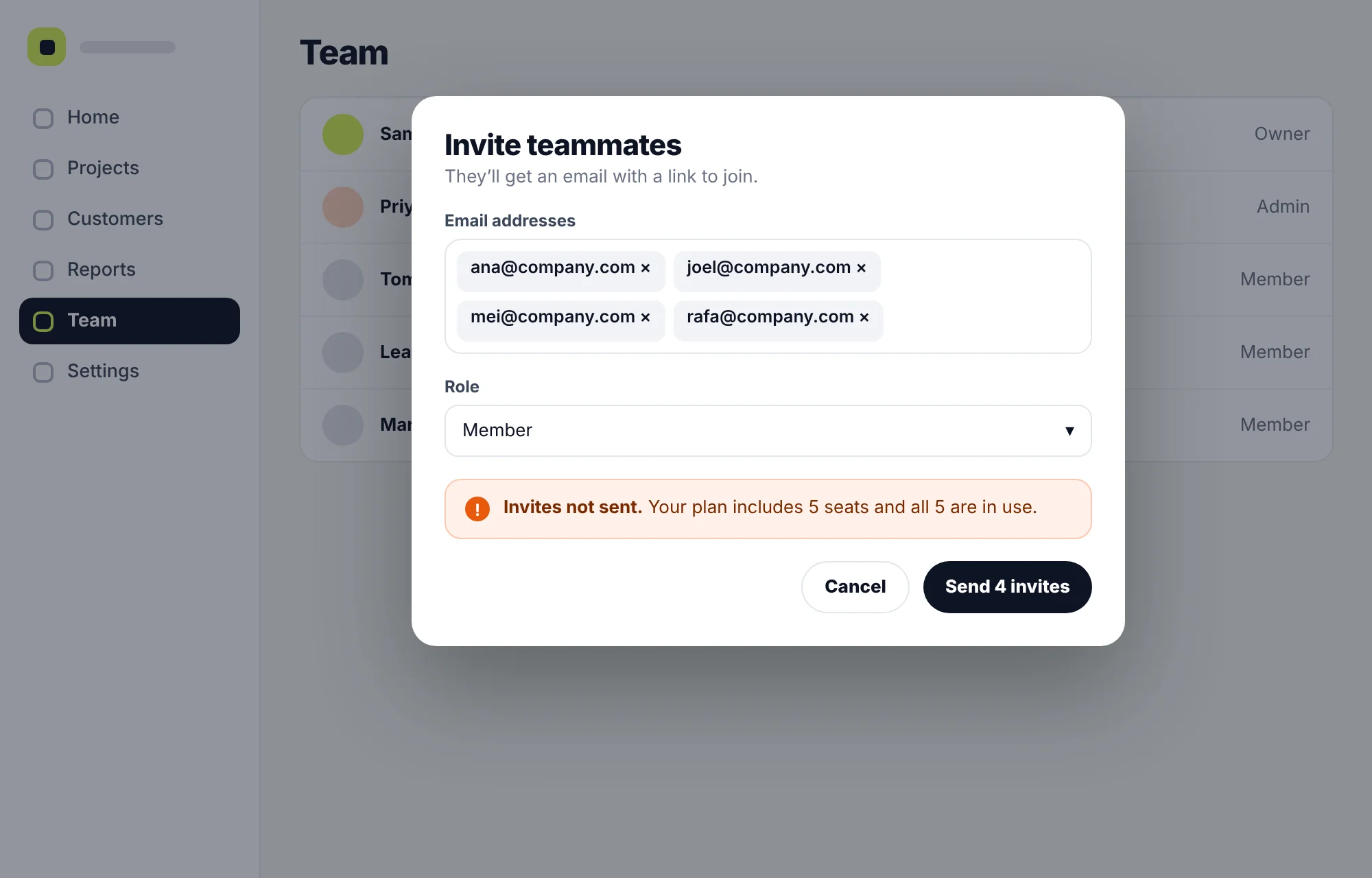
An admin types four email addresses and presses Send. Only then does an error say the plan has no seats left. It doesn’t say how to add seats, and the addresses are lost if they leave to upgrade.
Why it matters
Inviting colleagues is how many SaaS products spread through a team, and it’s also a moment when someone is ready to pay more. A dead end here blocks both.
Why it’s rated Critical
The task can’t be finished from this screen, and the way forward isn’t shown.
What we recommend
Show seats used and seats left in the invite form. When there aren’t enough, offer to add seats right there, and keep the typed addresses so nothing is lost.
How you’ll know it worked
Track how many started invites are sent, and watch for support tickets about seats and invites.
What you receive
What you get at the end of the audit
Findings your team can act on, in a format that’s easy to share with designers, developers and whoever sets priorities.
UX audit reportWorkspace onboarding and team setupSample report
1Summary
2What’s working
3Findings by journey
4Prioritised fix list
5Questions worth testing
Prioritised fix list
CriticalSeat limit only shown after invites are sentDesign
HighEmpty first dashboardDesign
MediumTwo main buttons on homeQuick
MediumFilters reset after opening a recordBigger
LowIcon-only actionsQuick
Findings report
Every finding with a screenshot, what we saw, why it matters, its severity, its evidence and a recommendation.
Prioritised fix list
All findings in one table, ranked by severity and effort, ready to move into your backlog.
Quick wins
Small changes with a clear benefit that your team can ship straight away.
What’s working
The parts of the product that work well, so they survive future changes.
Questions worth testing
Findings that need more evidence, with a suggestion for checking each one in your data or with users.
Walkthrough call
We take your team through the findings, answer questions and help you plan the first fixes.
Not part of the audit
Redesigned screens, prototypes and code. If you’d like help with the fixes, we can scope that separately once you’ve seen the findings. You’re under no obligation to continue with us.
Choose the scope
Audit one journey, or the whole product
The size of the audit depends on what you need to know. We’ll suggest a scope on the call, and you get a written scope, timeline and price before any work starts.
One journey
Best for: When you already know where the trouble is, such as onboarding or upgrading.
Covers: One journey, end to end, for one type of user.
Key journeys
Best for: When several numbers are moving the wrong way, or before planning the next quarter.
Covers: The three to five journeys that matter most, across your main user types.
Whole product
Best for: Before a redesign, after a period of fast growth, or when you’re taking over a product.
Covers: Every main area and role, plus consistency across the product.
What changes the size of an audit
Number of journeysNumber of user rolesReviewing your dataAdding user sessionsWeb, mobile or both
What we need from you
Getting started takes very little
We need access to the product and a little of your team’s time. Everything else is helpful but optional.
NeededTo start the audit
A login for each user typeTest accounts with realistic data, so we see the product as your users do: admin, member, viewer, or whatever roles you have.
A kickoff callAbout an hour on your goals, your users and the journeys you’re most worried about.
One point of contactSomeone who can answer quick questions about how things are meant to work.
HelpfulIf you have it
Product analyticsRead access to funnels and events, or exports of the reports you already use.
Session recordingsA sample of recordings around the journeys in scope.
Support themesThe questions and complaints you hear most often. A rough list is fine.
Earlier researchSurvey results, interview notes or findings from past tests.
No analytics yet? The audit still works. The findings will lean on expert review, and each one will say so. We don’t need access to your code or servers.
How the audit runs
From first call to findings walkthrough
Six steps, with your part in each one spelled out, so you know what to expect and when.
What we doWhat you do
1
Free call
What we doWe listen to what you’re seeing and tell you honestly whether an audit is the right next step.
What you doTell us what worries you and what you’ve already tried.
2
Written scope
What we doWe send the journeys, user types, timeline and price in writing.
What you doRead it, ask questions and approve it.
3
Kickoff
What we doWe agree the goals, the users and the questions the audit has to answer.
What you doShare logins and any data you can.
4
Review
What we doWe work through each journey as each type of user, and look at your data where we have it.
What you doAnswer the odd quick question.
5
Rate and rank
What we doWe rate every finding, estimate effort and put the fix list in order.
What you doNothing needed from you.
6
Walkthrough
What we doWe present the findings and hand over the report and the fix list.
What you doBring the people who’ll act on it.
After the audit
What happens with the findings
The findings are yours to act on however you like. These are the usual next steps.
Your team makes the fixes
The report and fix list are written so your designers and developers can work from them without us.
We design the fixes
Our designers turn the findings into new flows and screens, starting with the top of the fix list.
It’s an expert review of your software product to find where people struggle to use it. A designer works through your key journeys, such as sign-up, setup, everyday tasks and upgrading, as each type of user. They check them against established usability principles and bring in your analytics, recordings and support themes where you have them. You get a ranked list of problems, the evidence for each, and recommendations.
A UX audit is a review by an experienced designer. Usability testing means watching real people from your audience try set tasks. An audit is quicker and finds many problems on its own. Testing finds problems that depend on your users’ knowledge and habits. They work well together, and an audit often shows which flows are worth testing.
A findings report with screenshots, severity ratings, evidence and recommendations, a prioritised fix list, a list of quick wins, a note of what’s working, questions worth testing, and a walkthrough call with your team.
No. The audit gives you findings and recommendations, not new designs. If you’d like help with the fixes, we can scope UI/UX design work separately once you’ve seen the findings.
Yes. If you already know where the trouble is, such as onboarding, inviting a team or upgrading, a single journey is a good place to start.
The audit still works. Findings will be based on expert review, and each one will say so. We’ll also suggest what to start tracking so you can measure the fixes.
We look at how often it happens, how much it gets in the way, whether it keeps happening, and where it sits in the journey. A rating is a considered judgement, not a measurement. When your data shows how many people are affected, we add that to the finding.
We flag clear accessibility problems we come across, such as low contrast, missing labels or controls that can’t be reached with a keyboard. That isn’t a full accessibility audit against WCAG. If you need one, tell us on the call.
It depends on the scope: how many journeys and user types, whether we review your data, and whether we add user sessions. A single journey takes much less time than a whole product. You get a written scope, timeline and price before any work starts.
Designers from our team who design SaaS products. Your project lead stays the same from the first call to the walkthrough.
No. The report is written so your own team can act on it. If you’d like help afterwards, we can talk about it then.
Each finding includes a suggestion for checking the result, such as a step in your funnel, a support topic or a behaviour in your recordings. Measure before and after you ship the change.
Tell us what’s not working
Book a free call and tell us what you’re seeing: the numbers, the complaints, the screens you’re unsure about. We’ll tell you whether a UX audit is the right next step and what we’d look at first. If something else would help more, we’ll say so.

 Figma
Figma  Ahrefs
  Search Console
  Google Ads